Share the tutorial
In YouTube, tap Share and pick MindStep. Or paste a link. Any public tutorial works: 3D, design, motion, photography, music, code.
Turn any YouTube tutorial into your own personal course: lessons that explain why, the exact steps, and Stepper, a tutor that knows which step you're on.
No account needed. Your library stays on your phone.
Blender adds it 1 m wide. Set Major Radius to 0.1 m in the Add Torus panel before clicking away.
6:25Navigate the 3D viewport, shape primitive meshes in edit mode, and work with a non-destructive modifier stack.
You don't need another tutorial. You need to finish the one you saved, with someone next to you when you get stuck.
In YouTube, tap Share and pick MindStep. Or paste a link. Any public tutorial works: 3D, design, motion, photography, music, code.
Not just the transcript. It watches what's on screen too: the menus, the values, the shortcuts. Then it fact-checks the video. You can leave while it works.
Lessons that explain why. Every step with the exact values and the moment in the video. Quizzes and flashcards so it sticks. Today keeps you moving.
Summaries tell you what a video said. MindStep teaches you to do it. This is the actual course it built from Blender Guru's donut tutorial. Try the tabs.
We start with a primitive called a Torus, which is naturally ring-shaped. When you add a primitive, Blender shows a temporary operator panel in the bottom-left corner. Click away and its settings lock in.
Real dimensions matter. A default Torus spawns 1 metre wide, which causes lighting problems later, so we scale it down to a believable 10 centimetres.
A smooth, realistic-sized torus sitting centred in your viewport.
Why do we set the cylinder's vertices to only 14 when modelling the mug?
Low-resolution geometry is easy to edit. A Subdivision Surface modifier does the heavy smoothing later.
Say what you want to learn. MindStep plans every way in: a course written for you, free textbooks and classics it finds on its own, the best videos, or your own book. Each one becomes a real course.
Courses from your own books stay private. Free books come only from legal sources: OpenStax and Project Gutenberg. Never piracy sites.
Every lesson gets a diagram of its main idea, a real picture with its credit, and short videos on exactly that topic. Here's lesson 1 of a course MindStep built from the free OpenStax psychology textbook.
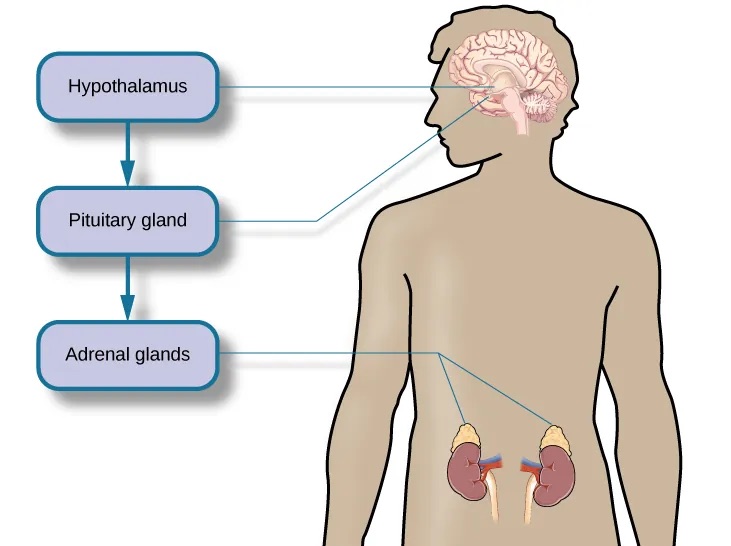
Tell the stimulus, response and appraisal models apart, and map the stress pathway in the body.
An event becomes stressful when we judge it as a threat and our resources as not enough. That judgement switches on a chain in the body: the hypothalamus, the pituitary, then the adrenal glands and cortisol.
 7:36HPA axis: what is its role in stress?Animated biology With arpanMake it a course
 8:44What is the HPA axis, aka the stress responseDoc SnipesMake it a course
Stuck mid-step? Tap Stepper. It already knows the course, the step you're on and what the instructor said around it. Show it a screenshot and it sees what went wrong.
Part of MindStep Pro, $10 a month.
A small glass panel that floats over whatever you're learning in. The step, the exact values, the shortcut and the moment in the video, right next to your work. Mark it done with a hotkey and keep going.
Mac beta, included with MindStep Pro.
Today, your library, plans, progress and every course, in a wide view: lessons on the left, the video or the book page in the middle, Stepper, notes and practice on the right. Switch back to the small panel any time.
Put the phone next to your screen. One step, its values and shortcut, and a jump to that exact moment in the video.
MindStep fact-checks what it watches. Mistakes in the original get flagged right inside the lesson.
Same software, shared concepts, or one course building on another: MindStep notices and puts them in the right order. Without re-watching anything.
Name a skill. Get a plan: a course made for you, free books, the best videos, and a path from where to start to who to follow.
Days you learned, time spent, courses finished. No streak guilt.
Turn any technique into a clean card for your story or a friend.
Forgot a shortcut? Ask. The answer comes from your own courses.
Open a course that uses shortcuts and MindStep offers to make a sheet: the shortcuts this tutorial actually uses first, then the most important ones for the software. It shrinks into a circle that opens over any page. Mac or Windows.
Try it on the one tutorial you've been meaning to finish.
For turning your whole Watch Later into courses.
For actually getting good at something, with help on every step.
Prices in USD. Regional pricing at launch.
Any public YouTube tutorial where someone shows how to do something: software, design, music, photography, cooking, code. Talks and vlogs work less well. There's nothing to follow.
No. Every lesson and step links back to its exact moment in the original video, so you keep watching the creator, just with a plan. MindStep credits the creator on every course and share card.
MindStep watches the screen as well as listening, so values and shortcuts come from what's actually shown. It also fact-checks the video and flags corrections in the lesson. You can always jump to the source moment to check.
Only when you show it. Attach a screenshot or a photo of your screen and Stepper compares it with the step you're on: the settings, the expected result, what's off. Without one, it never pretends to see your project; it asks one good question instead.
No. Your library and progress live on your phone. An account is only needed for Pro sync and Studio teams.
Yes. It builds in the background and shows up on Today when it's ready, usually in a minute or two.
iPhone first. Mac and iPad come with sync. Android is on the list. Tell us in onboarding if you need it.
Yes. Add a PDF or ebook, photograph the pages of a paper book, paste an article link, or import a screen recording. Steps link back to the page or moment. Ask for a subject and MindStep also finds free, legal books for it (OpenStax textbooks and Project Gutenberg classics) or writes a course from scratch. Courses from your own books stay private.
Diagrams are drawn by MindStep from the lesson itself. Pictures are the book's own figures when they're openly licensed, otherwise freely licensed images from Wikimedia Commons. Every picture shows its author and licence.
Yes, in beta, in two sizes. A small panel floats on top of the software you're learning in, with the current step, its values and shortcut, and the moment in the video; it can dock by the camera in the menu bar. When you sit down to study, open the full app: your library, plans, progress and every course in a wide view. It doesn't record your screen: it only knows which app is in front, so it can show that app's shortcuts.
Pick what you want to learn. We'll show you where to start.
 Intro to Psychology
 14.2 Stressors
 16:43
16:43